
FOR AUSTIN VACATION-RENTAL OPERATORS
Turn Every Austin Vacation Rental Stay Into a Personalized Local Experience
Give guests a branded, mobile-friendly property guide that combines arrival instructions, house information, Austin recommendations, local events, transportation guidance, and personalized itineraries.
Your property brand. Your guest relationship. Your Austin concierge.
No app download required. Use email, SMS, QR codes, or a direct property link.
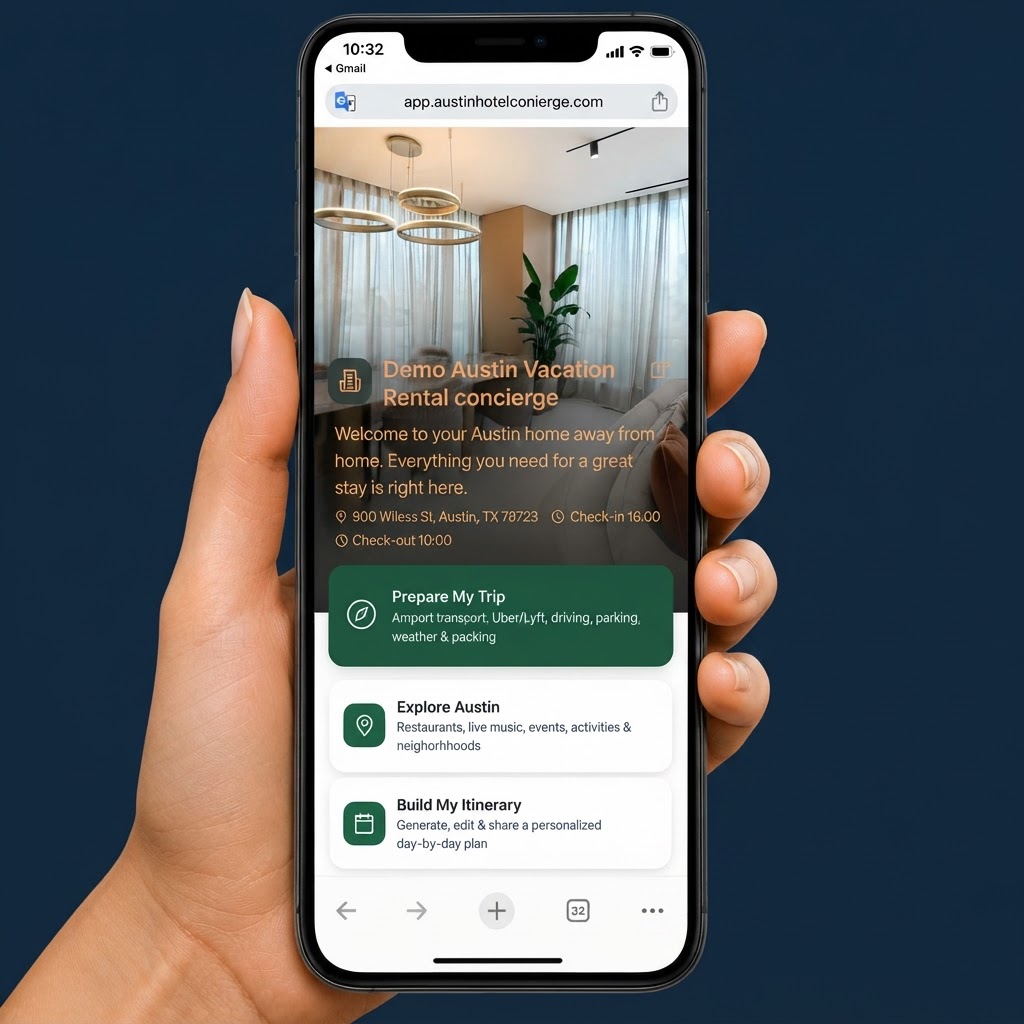
A booking confirmation is not a complete guest experience
Vacation-rental guests often need practical information before they arrive and local guidance once they are in Austin.
How do I access the property?
Where should I park?
What are the house rules?
How do I connect to Wi-Fi?
Where can I find groceries or delivery?
What should I do during SXSW or ACL Festival?
How do I get to Formula 1 at COTA?
Which restaurants are nearby?
What can we do if it rains?
Who should I contact if I need help?
Without a connected guest experience, this information is scattered across email threads, PDFs, text messages, booking platforms, and manual property-manager responses.
More than a digital house manual
Better arrival preparation
Provide directions, parking, access instructions, check-in timing, and practical arrival information.
A clear property guide
Give guests easy access to Wi-Fi, house rules, amenities, checkout instructions, trash information, and support contacts.
Personalized Austin exploration
Help guests discover restaurants, live music, museums, outdoor activities, walking routes, shopping, and local neighborhoods.
Event-aware planning
Help guests prepare for SXSW, ACL Festival, Formula 1 at COTA, UT events, conventions, concerts, and sporting events.
Less repetitive communication
Give guests answers before they need to contact the property manager, while keeping a clear support channel available.
From reservation to personalized property guide
Guest books the property
The property manager receives or confirms the reservation through the approved reservation or property-management workflow.
A secure guest session is created
The platform creates a secure, temporary guest experience connected to the correct property and stay dates.
The guest receives the property link
The link can be delivered through approved email, SMS, QR code, booking instructions, or a digital check-in workflow.
The guest prepares for Austin
Guests can review arrival information, property instructions, transportation, local recommendations, events, and itineraries.
The property manager stays informed
Managers can update property information, highlight amenities, review guest feedback, and identify frequently requested information.
Integration capabilities depend on the reservation, property-management, messaging, and channel-management systems used by the operator.
Give guests the information they need at the right time
Property information
- Check-in and checkout
- Access instructions
- Wi-Fi
- Parking
- House rules
- Trash and recycling
- Kitchen and appliance information
- Pool or outdoor amenities
- Pet information
- Accessibility information
- Emergency contact
- Property support
- Checkout instructions
Arrival and local support
- Airport-to-property directions
- Rideshare guidance
- Rental-car information
- Grocery stores and delivery
- Nearby restaurants
- Walking routes
- Local activities
- Weather guidance
- Austin event information
- Alternative plans for rain or sold-out events
Smart-lock codes, private access credentials, and sensitive property information are never displayed through an unsecured public URL — they are shared only inside a secure, validated guest session.
Help guests explore Austin their way
Guests can discover local experiences based on their dates, interests, budget, group size, transportation preference, walking preference, accessibility needs, and weather.
Guests can explore Austin freely while seeing clearly labeled property information, preferred partners, independent recommendations, and sponsored content where applicable.
Plan the stay, not just the destination
Guests can combine property information and Austin experiences in one flexible itinerary.
8:00 AM — Coffee at the property
Source: Property amenity
10:00 AM — South Congress walking route
Source: Austin local recommendation
1:00 PM — Lunch near the next activity
Source: Independent recommendation
3:00 PM — Return to the property
Source: Guest-selected rest period
7:00 PM — Live music
Source: Austin event
Guests can:
- Add activities
- Remove activities
- Reorder plans
- Replace recommendations
- View maps
- See estimated travel time
- Create rainy-day alternatives
- Create lower-cost alternatives
- Share the itinerary
- Contact property support
Your property information stays under your control
- Edit property information
- Add amenities
- Update house rules
- Add parking instructions
- Update arrival instructions
- Highlight preferred restaurants
- Hide unsuitable recommendations
- Remove outdated content
- Add seasonal information
- Set expiration dates
- Review guest feedback
- Create QR codes
- View engagement analytics
Every piece of content is clearly labeled:
Sponsored and commission-based recommendations are always labeled — they never appear as independent editorial content.
A helpful Austin assistant for every stay
The assistant can help guests:
- Find nearby restaurants
- Plan a walking route
- Choose activities for families
- Find indoor options during rain
- Plan around SXSW, ACL, Formula 1, UT events, and conventions
- Compare transportation options
- Build a daily itinerary
- Find lower-cost alternatives
- Find accessible options
- Understand property information
AI guardrails built in:
- Use approved property and Austin content first.
- Do not invent property rules, amenities, prices, hours, event dates, or availability.
- Show source or verification dates where possible.
- Do not expose private access codes.
- Do not guarantee safety, availability, accessibility, transportation, or admission.
- Tell guests to verify information that may change.
- Do not recommend alternative accommodation after the guest has booked.
- Escalate property support questions to the property manager.
Test your property\u2019s Austin concierge for 10 days
Create a temporary, property-specific experience using approved property information and sample Austin content. Test the guest journey before committing to a paid pilot or subscription.
The trial does not automatically become a paid subscription.
Request your 10-day property trial
Tell us about your properties and how you manage them. We will set up a property-specific trial with your branding, arrival instructions, and Austin content.
What happens next
- 1. We review your request and property details.
- 2. We schedule a short setup call to confirm your property information.
- 3. Your 10-day trial goes live — no automatic subscription.
Frequently asked questions
Do my guests need to download an app?
No. The property guide runs in the guest’s mobile browser. Guests reach it through email, SMS, a QR code, or a direct property link — no download required.
Does the 10-day trial become a paid subscription automatically?
No. The trial ends without automatic billing. Continuing to a paid pilot or subscription is always your choice.
Which property-management systems do you work with?
Integration capabilities depend on the reservation, property-management, messaging, and channel-management systems you use. We do not claim compatibility with any provider unless the integration has been implemented and tested for your account.
Make every Austin vacation-rental stay easier to plan
Give guests a branded property guide, practical arrival support, personalized Austin recommendations, and flexible itineraries — all without requiring a mobile-app download.